What is Picture to People ?

"Picture to People" (P2P) is a huge Computer Graphics project. It was started to create new softwares able to make 2D drawing, 3D rendering, vexel drawing, text effects, photo effects, image filtering and other complex Computer Graphics operations. It has been made from scratch, including its low level Computer Graphics libraries like Maccala. Nowadays, most final features produced for this project are released as free online tools available from its official website. This blog talks about Computer Graphics, mainly concerning Picture to People development.

"Only who makes has true knowledge. Knowledge is control. True power depends on total control. Only who makes from scratch has the real power."

Showing posts with label font effects. Show all posts

Monday, July 1, 2013

Font Effects vs Text Effects

I see many people, including many graphic designers,  using "font effect" (also known as "typography effect" or "typographic effect") and "text effect" as synonymous expressions. Well, for me they mean different things.

A text effect is the creation of a "special text" by using a font face as a guide. The result usually looks complex and very different of what a font can be, despite such result, in most cases, keeps that shape information inherited from the guide font.

A graphic text generated through an effect can look like anything and can have any color distribution. In most cases, it doesn't make sense changing that configuration to any arbitrary set of colors. Usually a text effect is a final product and should be used "like is". You can make small adjusts on it like you would make on a photo (modifying contrast for example).

A font effect is the creation of a kind of "new font" based on a existing one. The result of this process is something that could be a font itself and could even be used as input to generate text effects.

A font defines the shape of letters and must be simple enough to be successfully rendered by using one color (in fact, there will be pixels of other colors in edges if anti-aliasing is present, but that colors never will be different from an intermediate color between the rendering color and the background color). When we apply an effect to a font, we are modifying the shape of letters and maybe their spacing.

If what you need is a simple text created by using a regular font with "interesting modifications", in fact you want to use a font effect. If you think "I would like to create a text with this font, but would be nice if it was a little different", so you want a font effect.

Picture to People offers a very nice set of font effects, and you can choose from more that 450 font faces. If you like typography, you could like to use P2P Online Font Effects. Despite they are font effects, many of them go beyond what you can get by using a regular True Type font (ttf), as you can see in the second and third examples below.

These samples were created by starting from the good old Arial font. First you have a "Dashed Outline Arial font", after you have a "Frozen Arial font" and finally it's a "Smoke Arial font".


 Subscribe in a reader

Saturday, January 14, 2012

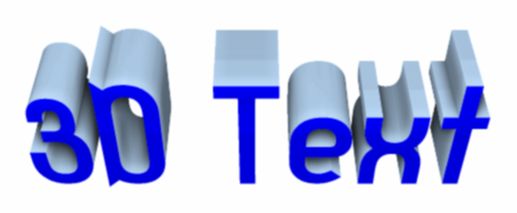
3D Text renderer with global illumination

I'm not having time to post frequently. Moreover, I usually like to post when I have a screenshot or teaser image to show.

I'm working very hard (as always) to finish my 3D text renderer that is based on global illumination algorithms. I never get tired of saying this kind of software generates very interesting soft shadows. It helps a lot to get more realistic results.

Well, let me get back to my arduous software development. Anyway, I post here a sample image of what is coming.


Subscribe in a reader

Thursday, September 29, 2011

Realistic graffiti text effects

I have already released the newest Picture to People online tool. It's the most professional software ever created to generate graffiti texts. You can get astonishing realistic results. It's like if you had really painted the graffiti on that walls in real life.

Some of the features that make this renderer able to generate astonishing realistic images are:
- ability to deal with three separated painting layer sets: back (optional), middle (optional) and front (the graffiti text itself);
- several drawing styles for each layer set;
- a list of fonts that are really suitable for graffiti drawing;
- several professional 3D text models with deepness setting;
- total control of color using;
- advanced gradient options;
- ability to draw the graffiti text over a background if desired;
- four styles of spatial fitting over the back surface with advanced configuration;
- a very big list of great backgrounds to choose from.

Below there are two examples about what this amazing tools can create. The first image is a graffiti text without background and the second one shows a graffiti text drawn over a back surface. Realize how the graffiti drawing lays on the surface curves in the last image.


Create your own professional graffiti effects by using the Graffiti Text software at Picture to People site.

Subscribe in a reader

Saturday, June 11, 2011

The best text effects

Picture to People official website already is 2.5 years old and already received more than 2,500,000 visitors (the counter is public at the site).

After a very long and hard work, we already have the biggest set of online professional Computer Graphics tools around the Internet, and there are much more coming.

To celebrate, I created an official "Hall of Fame" at Picture to People site. There I show many amazing text effects created by our beta test team and regular users exclusively by using our tools. This page is open for anybody who wants to participate. For sure there are uncountable effects and results to be discovered, tried and used, so anyone who gets a great image can send it to be shown in our roll. I will publish new samples from time to time.

Feel invited to visit The Best Text Effects page. I hope this page with some of our best text effects shows how powerful Picture to People is and inspires people trying to find more and more nice ways to use our graphic softwares.

Subscribe in a reader

Saturday, May 14, 2011

Picture to People now has font effects

Have you ever wanted TrueType or OpenType fonts were able to make a little more? Have you ever wanted to change a little an usual font face? Well, I did.

I created a tool to go beyond the traditional font rendering engines and turn regular fonts in something more complex or more stylized. It's our first tool totally focused on typography. If Picture to People usually releases "text effects", we could think about this like a software to make "font effects".

Below I show you a text made with a regular font and so two typographic transformations created using the same font as input.


This new feature was already released at the Typography Effects page.

Subscribe in a reader